19 Ways to Simplify ‘Sign Up’
(75 comments)
Account creation, or “sign up”, is vital to many web businesses – yet it’s a pain for most web users.
Here’s 9, 12, 17, 19 ways to simplify your sign up process and make it more user-friendly.
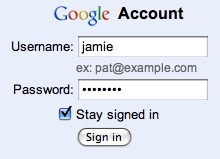
1) Use my e-mail address as account identifier

Most people have endless user names and frankly can’t remember which user name goes to what site. However, most people have just one, or perhaps a few, email addresses. So instead of having a username, simply use your users’ email as account sign in. But remember to always allow the user to edit his email address at a later point.
One less form field during sign-up, and a lot less users forgetting their “username”. Easier sign-up and easier sign-in.
Note: if you for some reason need a username, then at least allow “special characters” in it so people can use their email address if they want.
2) Allow me to use the password I always use

Most people have a couple of standard passwords they reuse, and there’s a chance it won’t fit if you require passwords to include either a number, a capital letter or be at least X characters long.
If security is a concern then have a password strength indicator that warns the user when the password isn’t all that secure – then it’s up to the user to judge if the extra security is worth the hassle of creating a unique password just for your site.
Note: there’s obviously exceptions where requiring a strong password is the right thing to do, such as websites that deal with private information or monetary transactions (e.g. online banking).
3) Ask for additional information after I’ve created my account

By asking your users for any non-vital information after sign-up, your sign-up form will be less intimidating and your users will get off their feet faster. Once users start seeing value in using your web app, they start seeing value in adding additional information to it.
Account image, date of birth and country are rarely necessary to create a user account, so consider asking for this kind of information later on.
4) Tell me if the username is already taken
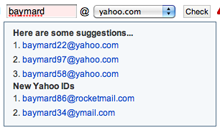
If an account already exists for the entered e-mail address, then immediately:
- Tell the user an account with this email already exists – don’t wait to do this until the form is submitted, do it live.
- Show a password field that will sign the user in with this email.
- Show a “do you want a new password sent to this email?” link.
It’s very likely the user just forgot he already had an account.
If you don’t use e-mail as account identifier, then suggest other related but available usernames.
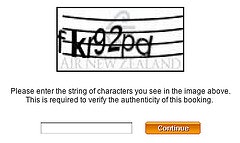
5) Do I really have to type “fkr93pd”?

For most visitors a CAPTCHA can be difficult to decipher since the code often carry no meaning and is essentially an eye check and typing exam combined – so don’t use one unless it’s absolutely necessary.
Make an A/B split test to see how much your conversion increase without the CAPTCHA and compare it to the actual amount of spam accounts created. Then make an informed decision based on this data. If you end up needing a CAPTCHA then at least have a look at these 6 CAPTCHA usability tips.
6) Sign me in automatically

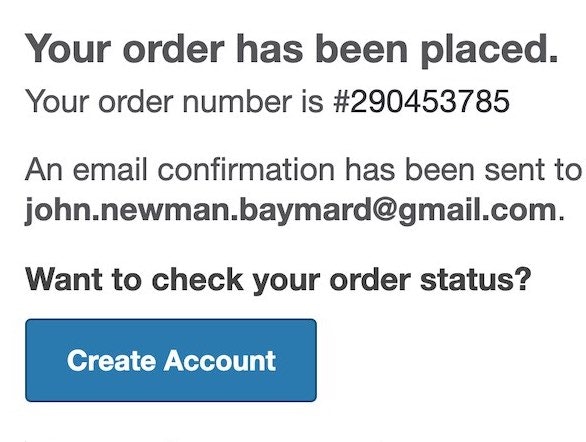
The reason your users create an account is probably because you required them to so in order to do/view/get whatever – so give it to them instantly after they signed up. Don’t require them to sign-in to the account they just created.
Oh, and do you truely need me to activate my account?
7) Make my welcome e-mail easy to find

It’s inevitable that some of your users will forget their password, so make sure your welcome email (containing both username and a password reset feature) is easy to find later on.
You can do this by having a proper e-mail subject like “Your [app name] account details” instead of things like “Welcome” or “Your new account”. Also, make sure the “from address” has you business name or URL as the nametag, and isn’t a cryptic mail server name.
8) Show me the sign-up form on your home page

Your sign-up form shouldn’t consist of much more than 2-3 form fields and a button, so if sign-up is the main goal of your marketing site, then there’s no reason to create a separate page for this. Instead show the sign-up form directly on the home page.
When you place your sign-up form on another page, you make the user consider abandonment before she even had a chance to see just how easy it is to sign up for your web app.
9) Give me a good reason to create an account

Nobody likes creating yet another user account, so at least give your users a couple of reasons – why should they sign up? What are the benefits? The more friction there is, the more important this becomes.
10) Suggestions?
Do you know other tips to simplify the sign-up experience? Then share them in a comment (75 so far).
Comments:
Janar Jürisson → Reply to this comment
I’am constantly abused by point 2 and can’t find justification for it. It’s like getting trend in these days. I have written little post about it also which can be found in my blog http://eagerfish.eu/password-strength-validation-user-experience/
Christian, Baymard Institute → Reply to this comment
Hi Janar, after reading your post I think we agree:
allow the user to user the password he prefers. My point with the password strength indicator was to merely tell the user that the password was weak, not to force him to pick another.
Jeff → Reply to this comment
See, I don’t completely agree with that. If the password is at least medium strength I would tend to agree, But, if the password the user normally uses is far to weak, then it is your responsibility as the site owner to not allow it. That is to protect both you (and your site) and the user’s account as well. Users may not like having to pick stronger passwords, but having such weak passwords is one of the reasons sites get compromised.
Even if a password is deemed weak, it can easily be strengthened by simply changing things like an “s” to a 5 or an “o” to a zero (0), and also using mixed case. That way, even if they are using their same password, it is strengthened by the slight changes suggested above.
Christian, Baymard Institute → Reply to this comment
If they change ‘s’ to ‘5’ it’s no longer the same password and the whole idea of the customer easily being able to remember his password falls apart.
For some sites that needs the extra security (banking, ecommerce sites with credit card stored), you’re right, don’t allow a weak password.
For other sites you have to evaluate whether adding more friction for every single user both during ‘sign up’, and at every single ‘sign in’, is worth the extra security. E.g. if you’ve have data-logs suggesting there are many attempts to breach your security, it’s likely worth it – but make the assessment, what’s the consequences?
Art Thompson → Reply to this comment
I’m curious what type of website doesn’t need “extra security” and is there even such a thing? A compromised ‘personal blog’ site is a potential serious security breach for any ISP. Frankly, any site administrator who doesn’t take security more seriously is asking for trouble. Marketing departments should not govern security policies and that’s exactly what your #2 recommendation suggests. BTW, changing an ‘s’ to a ‘5’ adds rudimentary “strength” at best. As site administrators continue to encourage users to reuse weak passwords the entire web continues to be an unsecure place that ultimately serves no one’s business needs.
RebateSense.com → Reply to this comment
Most of the web apps kind of assume there is one person behind an account (based on email address). If on a web app if a user can have multiple profiles then a username metaphor would fit better. Just wanted to point that out.
Jacob Singh → Reply to this comment
I would not recommend including a plain-text password, especially one they “use for everything” in their welcome email. email is not terribly secure and it’s not good to leave records of credentials sitting around. Best practice is to provide a reset password function and never store the unencrypted password anywhere or send it to the user.
Christian, Baymard Institute → Reply to this comment
Thanks for pointing it out. Edited the article accordingly. Thanks
Ricardo Tomasi → Reply to this comment
How would you reset a password if you can’t send it to the user’s email? “Security questions” are not an option.
Chances are, if that password is used for everything, it’s secured by itself, so it’s a moot point :)
Christian, Baymard Institute → Reply to this comment
By sending a “click here to reset your password” link to the users email, that will sign him in and take him to a form where he can type a new password.
Ben Stovold → Reply to this comment
I’d add: use the same form for signup and logon. Just ask for an email address and then display the appropriate fields (eg. password or minimal signup info). Unlike others, including examples sighted in this article, Instapaper gets this right… and it’s ux is much better for it.
Christian, Baymard Institute → Reply to this comment
Great addition. Thanks
Ann E. Mouse → Reply to this comment
But according to security ‘experts’ you are not supposed to reveal if an email is registered or not. By doing this, you are allowing anyone to find out if a certain email is registered.
Garry Lee → Reply to this comment
It’s a really good list, all obvious but I think we often forget the obvious, so those things are normally the most important to remind people!
I would agree with Jacob that you should never put the password in the welcome email, it is not secure and certainly not if you are suggesting allowing them to use the same email they use elsewhere. The forgotten password is something people are used to and if you have used there email address as a user name then it is easy to get.
Christian, Baymard Institute → Reply to this comment
Thanks. Articles updated with Jacobs suggestion, I guess I was a little too fast with the “publish” button :)
kurren → Reply to this comment
Account activation, as in confirm user’s email, is indeed necessary: if email was mispelled there’s no way to contact user…
Christian, Baymard Institute → Reply to this comment
If the email is typed wrong then how will you send the “activation email” to the right email address?
kurren → Reply to this comment
I guess the fact that you cannot ‘activate’ you account since you did not received the activation email will get you back to the registration process.
As opposed to being able to login straight away, interact with the service and then, a few weeks later when you’ll forget it, there’s now way to recover your password (meaning you lost all the work/relationships/time) you built in using the service.
It’s easy to keep the session open, if you haven’t received the email straight away you may use a re-send link/button forcing to re-check (re-introduce) the email.
Christian, Baymard Institute → Reply to this comment
I can see how they might be more useful for some types web applications/accounts than others.
In the end it’s a matter of how much sign-up friction you want to add for every single of your new users (log-in to email, wait for activation mail, possibility of being marked as spam, click link, back to website) versus how good/bad an experience you want to provide for the users that mistype their email during sign-up.
kurren → Reply to this comment
I’d rather lose some users not willing to use, a quite spread and common confirmation email, to have to deal with users completely cut off from their accounts.
Christian, Baymard Institute → Reply to this comment
I might be a bit too narrowly focused on this one as I’ve just worked with a social gaming site (unnamed) where we discovered around 12% never clicked the activation link. Some of the abandonments are likely from users who sign-up from another computer than their primary and don’t have webmail/can’t access their mail at the sign-up moment.
I suspect the activation link abandonment rate is normally lower on more “serious” applications, but for them the tradeoff was a no-brainer.
For more serious web application I certainly follow your point, but I still think everyone should measure their “activation link” abandonment rate, and then make an informed decision about whether it’s worth to keep or not.
Nerijus → Reply to this comment
But what if I typed wrong email address or make mistake on typing email address? When I just one time can do something on application, the second time when I come back I will need to register another account?
Christian, Baymard Institute → Reply to this comment
True. Again, measure your “activity link” abandonment rate and then make a business assessment which is worse. I’m not telling you to ditch it in every single case, I just want you to consider what’s best for year overall business. For some “activation links” are, for others they aren’t.
Some dude → Reply to this comment
Srongly inspired by http://theoatmeal.com/comics/shopping_cart
Christian, Baymard Institute → Reply to this comment
A much more fun way to cover some of the same topics. Thanks for sharing.
Colin BONI → Reply to this comment
I have got one : a experimental method to visualy recognize you entered the right password without disclose it.
opinion needed!!
http://lab.arc90.com/2009/07/09/hashmask-another-more-secure-experiment-in-password-masking/
Christian, Baymard Institute → Reply to this comment
Great to see somebody experimenting with the password form fields. The koncept might work well, but in the current implementation it’s a bit hard to see the graph if the password field has a more “normal” size (compared to the demo one).
jcubic → Reply to this comment
Account creating form only with one field “email” and new random password could be send to this email with automatic link to account settings (this can be handled by create unique token for the user and put it in url) where user can change the password and set other fields like user name etc. It should always point to settings, so user can change their password if they forget it.
Christian, Baymard Institute → Reply to this comment
Great idea! especially on sites where sign-up friction is key (e.g. if they need to use the app before even understanding it’s benefits – e.g. a game or social media extension).
The obvious drawback is of course that every user will have to change his password, and the ones that don’t do it to begin with will likely try with their standard password the next time they sign-in.
Thanks for sharing.
JH → Reply to this comment
Don’t make me sign in every time I visit the site. Just keep me signed in for 2 weeks like on Yahoo.
Christian, Baymard Institute → Reply to this comment
Great tip for signing-in. There will be an article about reducing sign-in friction within a week or two, I’ll be sure to include it.
Razor → Reply to this comment
One word: OpenID.
I wish it became the standard for the vast majority of websites a long time ago, except for those that could benefit from the added security of a new user/password combination (financial sites, for instance).
Is there any particular reason you didn’t mention it? I have never implemented it on a real website so don’t know if it’s significantly harder when compared to the more traditional approach.
Christian, Baymard Institute → Reply to this comment
Great supplement. Skip the account creation altogether. Allowing user to use their Facebook account falls into the same category as well. Thanks
Dennis → Reply to this comment
Great!
As others mentioned above, OpenID & OAuth (Twitter, Facebook, and more..) sign-up is crucial at least for a couple of sites (banking sites excluded).
Daniel → Reply to this comment
Good article, thanks. Just one question: what are the pros/cons of using eg facebook connect/linked in? This should speed up the registration process. However I am not sure what it means wrt ownership of user registration data.
AHHP → Reply to this comment
I’m not interested with your holidays!
Please don’t use my email address to send newsletter or such! Ask me while signing up or let me join by myself…
AHHP → Reply to this comment
This is my idea.
Thanks for great article.
Christian, Baymard Institute → Reply to this comment
Thanks for sharing.
Jamie previously written a post on how most web visitors actually equals account registration with also receiving a newsletter /spam: http://baymard.com/blog/people-think-registration-leads-to-spam
Anne Dougherty → Reply to this comment
Tell me you require a certain password format (e.g. mix of letters and numbers) right on the sign-up form not in an error message after I’ve chosen a password.
By telling me up front you’ll also lessen the number of times I forget my password since I won’t have to fight with my brain to remember the password you forced me into rather than the one I chose initially. By lowering the barrier to remembering my account details, you increase the chances I’ll come back to your site.
Christian, Baymard Institute → Reply to this comment
Great addition if for some reason it’s not possible to adhere to “2) Allow me to use the password I always use”
Thomas Scholz → Reply to this comment
Use regular form fields, not some made up JavaScript thingies. Otherwise my browser’s password manager will fail.
Christian, Baymard Institute → Reply to this comment
Thanks. That’s a really good one.
kimblim → Reply to this comment
“Use my e-mail address as account identifier” and “Oh, and do you truely need me to activate my account?” don’t work well together – if you actually use the e-mail address as the unique identifier on an account, it is imperative that the user verifies it – otherwise I could set up an account using, say, info@baymard.com everywhere I wanted to, and it would (although in small measures) be identity theft…
Otherwise: stellar article!
ThePat → Reply to this comment
With regards to an online store. Instead of requiring account creating before check out. Have an option to use the included information to create an account.
In a previous shopping card I worked on, we simply had a check box for ‘create account’ and if checked it opened a div ti add the password.
Then the user doesn’t need to step out of the checkout funnel, or enter the information more then once.
melvin → Reply to this comment
actually you have to type fkr92pd
Christian, Baymard Institute → Reply to this comment
My point exactly ;)
Glad somebody noticed it.
Jay → Reply to this comment
I wanted to add one in:
If you goto a login page and type your email address or username in and realize that you’ve forgotton your password. When you click the ‘forgot password’ link and it takes you to the next page, the website should automatically move the email address or username that you’ve already typed in to the next page.
Christian, Baymard Institute → Reply to this comment
Again, great tip for signing-in. There will be an article about reducing sign-in friction within a week, I’ll try to include it there. Thanks.
David Hamill → Reply to this comment
I’d recommend being very careful about using the same form for sign-in as registering. It’s very easy to create a confusing page that acts as a virtual brick wall for new users. If you’re going to do this try including the question “Do you have an account already?” in the way that Ebay does.
Another option is to favour new users in the design giving registering more emphasis than signing-in. This makes signing-in more difficult than it could be but works on the assumption that you’ll work it out the first time and then understand how to do it. You’re more likely to lose a new customer than an existing one when you add points of friction.
Nibo → Reply to this comment
You could skip the “repeat password input” and just use an input that shows the actual password as you type it in. One less field in the form. For the users that need the discretion you could always have an option box next to the password input field for toggling its input type.
David Hamill → Reply to this comment
That would make it a bit annoying to change if you noticed you’d typed it wrong.
Sven Tilburg → Reply to this comment
Make the CAPTCHA invisible!
This ain’t gonna work on huge sites that are specifically targeted by spammers, but here is a nice trick for the normal mass spam victim site:
a) Add a form field labeled “Homepage” and prefill it with a default value, like “http://dont-fill-this-out”
b) make the label and field invisible using CSS (display: none;)
c) in your script check if the default value was altered. Spam-Bots will fill out all fields and are not capable of understanding CSS.
Who ever fills that out is a bot….
bliz → Reply to this comment
Decouple the email address used for username and the email address used to make password resets. By default, make the latter the same as the former via a checked “use same email for password recovery”. This is as I may lose access to that email and my password to your website.
Seba → Reply to this comment
Great advices!
Another important thing when the users have to enter data: show clearly the data-entry format. Some sign-up forms are a nightmare when you have to write dates, phone numbers or zip codes.
Henrique → Reply to this comment
"
17) Don’t make me enter my password twice (added by Nibo)
You could skip the “repeat password input” and just use an input that shows the actual password as you type it in. One less field in the form. For the users that need the discretion you could always have an option box next to the password input field for toggling its input type.
"
Please, don’t. The reason to ask the password twice is to make sure the user KNOWS the password. I doesn’t matter if you echo the password on the screen or not, if you ask it only once, the user will mistype it, not see he mistyped because he skipped to the next field in a rush, finish his signup and be frustrated that he can’t login and say your app is broken.
CKN → Reply to this comment
I’m all for using e-mail addresses as usernames in the sign up/sign in process, but please don’t use it as a unique identifier if that means that I can’t change my e-mail address later.
Christian, Baymard Institute → Reply to this comment
Great addition to point #1.
David Elks → Reply to this comment
I’m a journalist learning dev skills. This is a simple, no nonsense post.
ElegantCoder → Reply to this comment
Thank you for the great posting!
I translated this post into Korean. The translation is posted on my blog.
You may see it here:
http://elco.tistory.com/entry/회원가입-프로세스를-심플하게-만드는-17가지-방법
If you mind, i’ll remove the translation. Please reply me. Thank you.
Christian, Baymard Institute → Reply to this comment
I don’t mind at all as you link back to the original.
Thanks
Justin → Reply to this comment
Disagree with the email address as a rule. It really depends on who is using your site and what they’re using it for.
Some applications do not allow you to change your user name once you have signed up, and in those situations you should definitely avoid the use of email addresses.
If you sign up at work, for instance, and then leave the job for another position you will end up having to use your old email address to sign in, or create a new account and lose the last account. It makes matters even worse when people use the email address as the user name and then don’t collect another email address.
Probably doesn’t need to be take off the rules, but definitely should be considered carefully when putting together your registration package.
Christian, Baymard Institute → Reply to this comment
They are all meant as guidelines, not rules. I think the solution here is simple: always allow the user to change the email address after they’ve signed up, as CKN also mentions.
Dave May → Reply to this comment
Don’t ask for information that you can obtain other ways. If you would like to know the location of the user, but don’t need an exact address (say.. To give to a territory manager), use a service that can get the location from the IP address. 90% as effective and removes 1 to 5 fields over asking for address, zip or country. Obviously less fields increases signup.
Christian, Baymard Institute → Reply to this comment
Prefect, thanks Dave. I’ve added it to the list.
Paul → Reply to this comment
Spread your signup process out as much as possible; have just a user/pass field, then ask for the email address on the next page. Asking for less info up-front is less intimidating, and once they are committed (already typed in a user and pass) they are less likely to bail when you just want one more bit ..
zack → Reply to this comment
I never use capthas in the regular sense – they visually ugly, intrusive and just plain annoying.
What I do for that is have javascript generate a unique target for the form post.
none of the spammer scripts i have seen are able to parse Javascript.
Dont require logins/accounts unless absolutely necessary.
Christian, Baymard Institute → Reply to this comment
Great idea zack. At this site we use akismet that takes 99.9% of all the bot generated spam. But for some time we had problems with manually submitted spam comments. They all were submitted as “replies” to other comments, so we also switched to using javascript to initiate the reply form, and since then most manually submitted spam is gone. So I’d assume it’ll also work on a sign-up form.
Daniel Chatfield → Reply to this comment
in some countries the email activation is required by law including the US.
Christian, Baymard Institute → Reply to this comment
Do you have some sources that it is law in US? I know many ISP and most email newsletter services requires this (and some articles describing the can-spam act hints at this), but as what I have read in the actual can-spam act “double opt in” (such as activation emails) isn’t a requirement, only “single opt in”: http://www.spamlaws.com/federal/108s877.shtml
Also in these two articles it is said “double” isn’t required:
http://www.lsoft.com/resources/optinlaws.asp
http://www.clickz.com/clickz/column/1692179/complying-with-can-spam-a-point-checklist-marketers
Moosh → Reply to this comment
I’m more hardous. email WON’T be mandatory !!
Email is not certified. We make him overconfident.
Email is just a notification system like another.
A trust him too we have seen recursive bullshit like “you lost the password of your inbox, click here to reset the password. We sent you a new password via email”
A trust him too let make very sever security protection on your application but forget that you delegate your security to an out of control security system. (best way to hack a lot of account is to hack the mail box, scan account reminder and welcome in archive, run a “reset password on the fetched list and take over the accounts”.
Don’t belive in mails !
Jeffrey Bennett → Reply to this comment
Here’s an idea: integrate logins and signups using Facebook, Twitter, LinkedIn, etc. Research proves that conversion rates go way up when using these popular services.
Jeffrey Bennett → Reply to this comment
Here’s one more idea: if the user submits a form and it returns an error, don’t make them retype in everything! Nothing makes users leave your form faster than having to fill out everything again, because there was a minor problem with the data.
Christian, Baymard Institute → Reply to this comment
Thanks for sharing Jeffrey. I’ve added it to the list.
Jenn @ Integraphix Creative Agency → Reply to this comment
Everything on here is relevant and after reading the comments, – I agree with Jeffrey, don’t make me retype everything. It’s intensely annoying – especially when it doesn’t tell me exactly where the error is.
tyler → Reply to this comment
The password thing is so annoying! It just forces mainstream users to write down their passwords or never come back because they can’t remember their 6-10 letter password with one number, no symbols and one uppercase and lowercase letter.
xkcd says it best: http://xkcd.com/936/.