What is a Product Spec Sheet? Examples & UX Design Inspiration
Spec sheets help website users and shoppers to quickly understand important product information. Here’s how to get them right.
Key takeaways
- Use a single-column layout with key specs first, clear subheadings, and row styling to make data easy to scan
- Standardize labels, attribute ordering, and units of measure while using tooltips to explain complex jargon
- Implement collapsible sections or truncation on mobile to avoid excessive scrolling without making the layout too dense.
64%
of ecommerce sites’ spec sheet UX performance is poor or mediocre
30%
of sites have severe issues with specs across products of the same type
Specification sheets – often referred to as ‘spec sheets’ – help website users and shoppers to quickly understand important product information.
However, almost two-thirds (64%) of ecommerce sites’ spec sheets are poor or mediocre.
In this guide, we’ll share product spec sheet design best practices and some product specification UX examples for inspiration.
What is a product spec sheet?
A product spec sheet is a structured table or list that presents a product's technical attributes and characteristics in a standardized format.
Spec sheets are common in categories where extensive research and consideration is required, and specifications directly influence purchase decisions. For example:
- Electronics
- Appliances and white goods
- Tools
- Furniture
- Outdoor equipment
The spec sheet gives shoppers the precise information they need to evaluate whether a product meets their requirements and compare against other options. It should therefore include key information such as essential technical attributes, characteristics, ingredients, and measurements relevant to the product category.
Spec sheets are typically found on the product detail page (PDP), either as a dedicated tab, an expandable section below the main product description, or an inline table within the page.
Why does product spec sheet UX matter?
The main purpose of a spec sheet is to provide valuable information to your user. However, design and usability matter just as much as the content itself.
If a shopper is deciding, for example, which laptop to buy, it’s important that they’re able to:
- Easily find the product’s specifications
- Understand any jargon and technical terms
- Compare between the products they’re interested in
The spec sheet should therefore help them do all of that, and enable them to make their final purchase decision.
A spec sheet that's hard to scan, uses jargon without explanation, or presents information inconsistently across products has the opposite effect by creating unnecessary friction at the highest-intent moment in the user’s purchase journey.
When the experience is poor, it can lead the user to abandon and push them to a competitor site to find the information they need (where they’ll more than likely complete the purchase).
3 product spec sheet UX design best practices
The entire purpose of a spec sheet is to help your user find and verify a specific piece of information quickly. Here are three product spec sheet design best practices that help you achieve that.
1) Make it easy to scan
Spec sheets should help users locate information quickly, not force them to decode a wall of data. Design is therefore a critical consideration; the spec sheet should be easy for users to scan and quickly find the information they need.
Baymard’s research shows that a single-column layout works best here (with clear attribute labels to the left of the table). Group related specs under clear subheadings, display key details first, and use row styling so users can easily match labels to values.
Use alternating backgrounds or subtle borders within the table to connect labels directly to their values and make it easier for users to scan the information.
Also consider mobile users, where narrow viewports make multi-column designs difficult to view and interact with. If your spec sheet is particularly long, consider using vertically collapsible sections or truncation rather than compressing the layout.
2) Explain jargon and terms users may not understand
Spec sheets are often used by shoppers who are knowledgeable about the products they’re viewing, but that’s not always the case.
“In usability testing, we see that spec sheets on the product page can be immensely helpful to both users considering spec-heavy products, users with a high level of domain knowledge about a specific product type, and users trying to decide between different products of the same product type.”

While technical accuracy is paramount, the content must also be easy for regular users (including those whose product and domain knowledge is limited) to understand.
Baymard’s testing has regularly uncovered issues with jargon and unclear labels in product specifications. To overcome this, ensure you define any key jargon or terminology by using tooltips or inline microcopy. Essentially, you should assume that users have no vendor or industry knowledge, which means your spec tables will cater to everyone.
3) Standardize labels, order, and units across products
Spec sheets are a huge part of the product comparison process. If the specifications for similar products use different labels, different units, or different ordering of attributes, users can’t compare them reliably.
Unfortunately, it’s a common issue across ecommerce websites, leading to unnecessary friction and abandonment.
30%
of sites have severe issues with specs across products of the same type
To ensure consistency and ease-of-use, display spec sheets so that the same attribute always appears with the same name, in the same format, with the same unit conventions across products of the same type.
Always append the unit of measure to numerical values. Numbers without units are easy to misread, and Baymard has repeatedly observed users becoming confused with ambiguous metric versus imperial measurements.
“Product descriptions and spec sheets must clearly outline any differences in materials, dimensions, ingredients, features, etc.”

Product spec sheet examples and UX design inspiration
If you’re auditing your website or reviewing your spec sheet design, here are some best-in-class examples from leading ecommerce websites to help guide your thinking.
Home Depot’s easily scannable power tool spec sheets
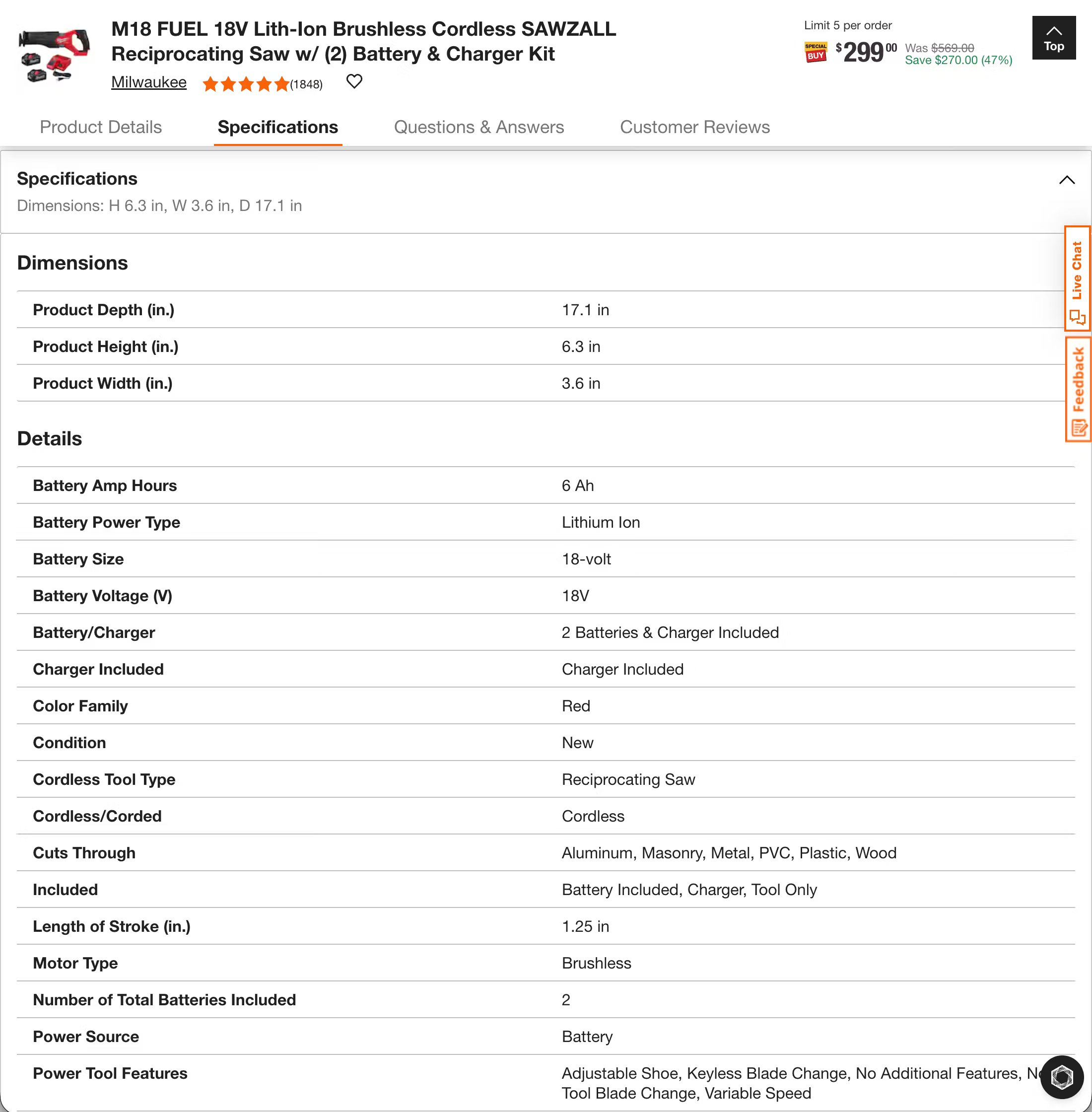
In this example from Home Depot, the product spec sheet for a cordless reciprocating saw is displayed in a table with a single column alongside clearly defined labels and headings for key attributes.
This is uniform across all other products of the same type, which means the information is easy to understand and helps users to easily compare similar products during the consideration phase of their purchase journey.
Best Buy’s jargon-busting spec sheets
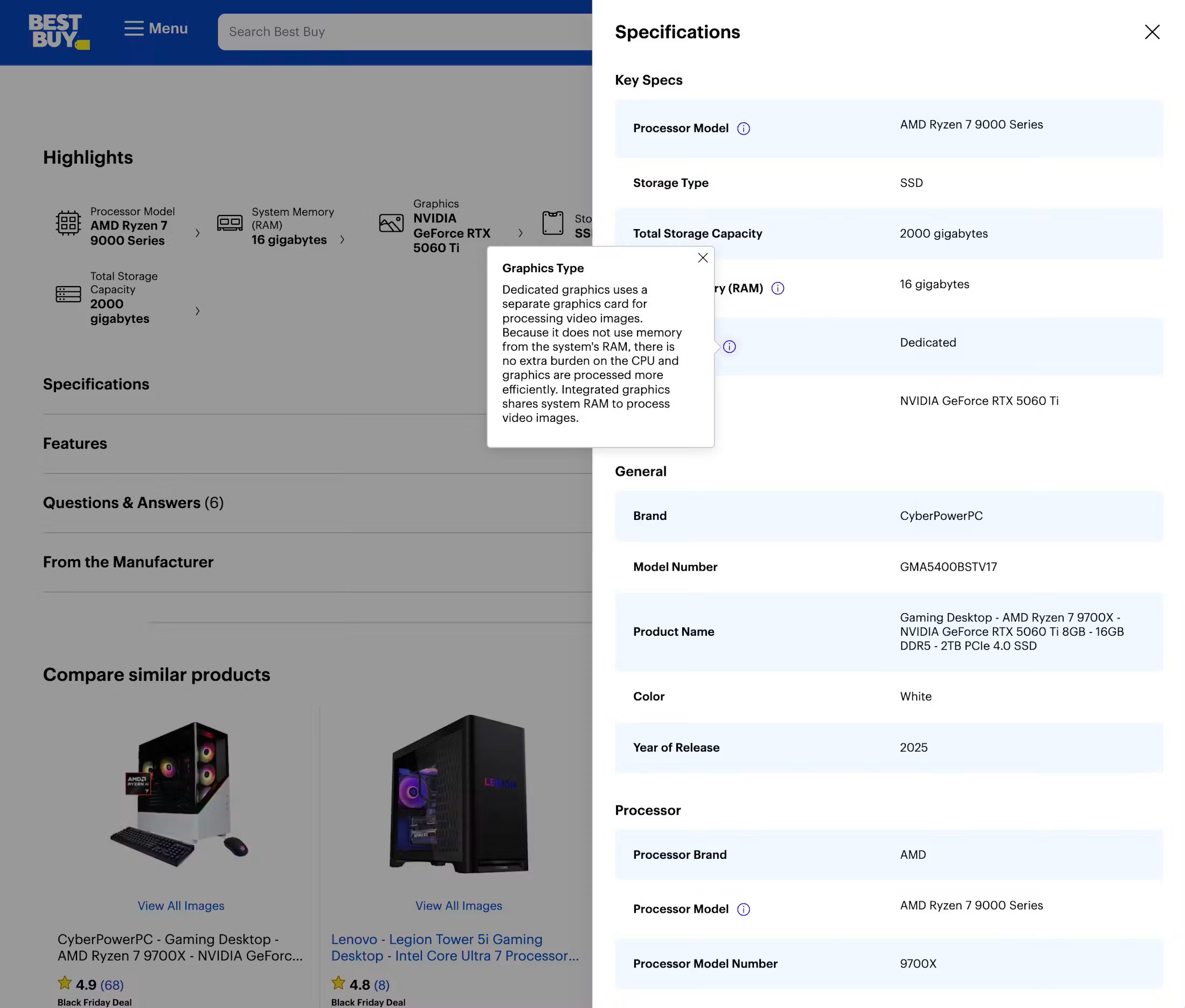
Best Buy displays product specifications in an easy-to-understand manner, with alternating colors making it simple for users to distinguish rows of information.
Any potentially confusing terms and jargon are supported by helpful tooltips, as shown in the example above, where a user is viewing additional information about what ‘Graphics Type’ means on a computer product.
Lowe’s user-friendly mobile site spec sheets
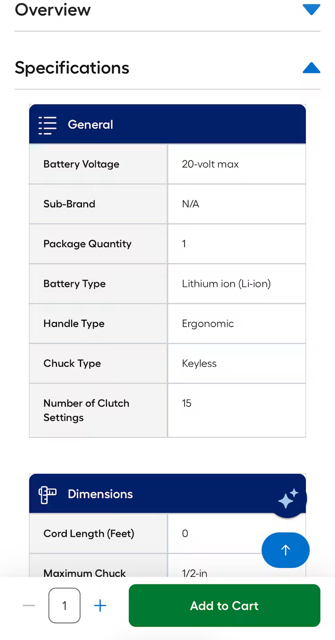
Lowe’s uses a clean layout with borders and color styling, helping to make the spec sheet scannable and easy to understand.
In this mobile example, the site uses collapsible sections for the product specification tables, eliminating the need for excessive scrolling and providing a better user experience.
Uncover your biggest conversion blockers
Find tailored UX opportunities proven to improve usability and conversions. Get a list of top UX improvements prioritized by impact and best practice implementation examples.
Product spec sheet UX: Frequently asked questions
What is a product spec sheet?
A product spec sheet is a structured table or list on the product detail page that presents a product's technical attributes in a standardized format. It helps shoppers evaluate whether a product meets their exact requirements and allows them to easily compare options.
What should a product spec sheet include?
A spec sheet should list essential technical attributes, characteristics, and measurements relevant to the product category. Crucially, it must also include standardized units of measure alongside numerical values, as well as tooltips or microcopy to explain technical jargon.
What are the UX best practices for spec sheets?
Use a single-column layout with clear subheadings, key attributes first, and alternating row styling to make data easy to scan. Keep terminology and structural ordering completely uniform across similar products, and use collapsible sections to preserve space on mobile screens.
Weekly UX Research, Insights, and Updates
Join 60,000+ UX professionals. Get the latest UX research, practical guides, and Baymard news delivered to your inbox every week.
Loading...