Key Takeaways
- Most sites benchmarked by Baymard obtain “mediocre” or worse performance scores in the area of Gifting Flow and Features
- Gifting options that are poor or unclear can cause users to abandon their purchases altogether
- This article offers 4 research-backed UX best practices to make it easy for users to buy gifts
Ideally, buying a thoughtful gift provides pleasure to the buyer, the receiver, and the seller (in a financial sense).
Unpleasurable is a buyer’s panicked realization that they have messed up the gift order by sending the gift to themselves, sending it to the recipient with a normal receipt, or failing to choose any gift options at all.
Gifting should be easy, but as our ecommerce UX benchmark shows, gifting options vary widely from site to site, and we observe in Baymard’s usability testing that users looking to place an order as a gift must carefully assess each site they visit for the availability and cost of gifting options.
Based on our research findings, this article describes 4 ways that sites can help users fully understand — and therefore feel comfortable using — available gifting options.
1) Allow Users to Place Gift Orders (46% Don’t)
“I don’t see any point that it let me tick off [that this is a] gift shipment…This just looks like I’m ordering it for myself but shipping it to a different address. So I don’t know that this had everything I was looking for.”
To begin, it’s surprising that on 46% of benchmarked sites — where some users could reasonably be expected to want to place gift orders — gift ordering isn’t even an option.


Neither the cart (first image) nor checkout review page (second image) offer users at Costco the option to mark the order as a gift. In practice, some users will hesitate to move forward, valuing the benefits of gifting options (namely, including a personalized message and hiding prices on the receipt).
While users seeking to place a gift order are typically a small subgroup of a site’s users (depending on the type of site), these users are completely focused on being able to place a gift order, coming to the site with the specific goal in mind.
For these users, the ability to designate the order as a gift is highly valuable, and during testing we found that the ability to hide order costs and include a personalized message on the order receipt were top priorities for participants sending gifts.
When participants were unable to explicitly label their order as a gift, some opted to abandon their order (see guideline #650).


Williams Sonoma (first image) and Walgreens (second image) both offer the ability to explicitly designate orders as gifts.
Therefore, to reassure users sending gifts and meet their expectations, sites featuring giftable items should provide the ability to designate orders as a gift.
Allowing users to select an item as a gift will allow them to proceed confidently with their gift purchase — while not providing the option at all ensures at least some of these users will abandon.
For details on executing different levels of gifting options, see guideline #646.
2) Show Gifting Options on the Product Page (80% Don’t)

Here Gamestop’s product page gives users options for shipping and coupons, but not gifting. Users have to wait until the product is in their cart before they learn how they can give it as a gift.
Some especially thoughtful users will want to know what gifting options a site has to offer early on — while still in the product-search phase.
This is to avoid wasting time finding a suitable gift only to be disappointed during the checkout process when gifting options are nonexistent, too expensive, or too complicated to understand (see guideline #805).
If users are unclear about the gifting options being offered for a particular product, they may not be willing to add the product to the cart or investigate the site’s nonproduct content in order to learn whether orders can be placed as gifts and what gifting features are available.

Amazon’s product page tells users that they can send the item as a gift and include a custom message while they are considering the purchase.
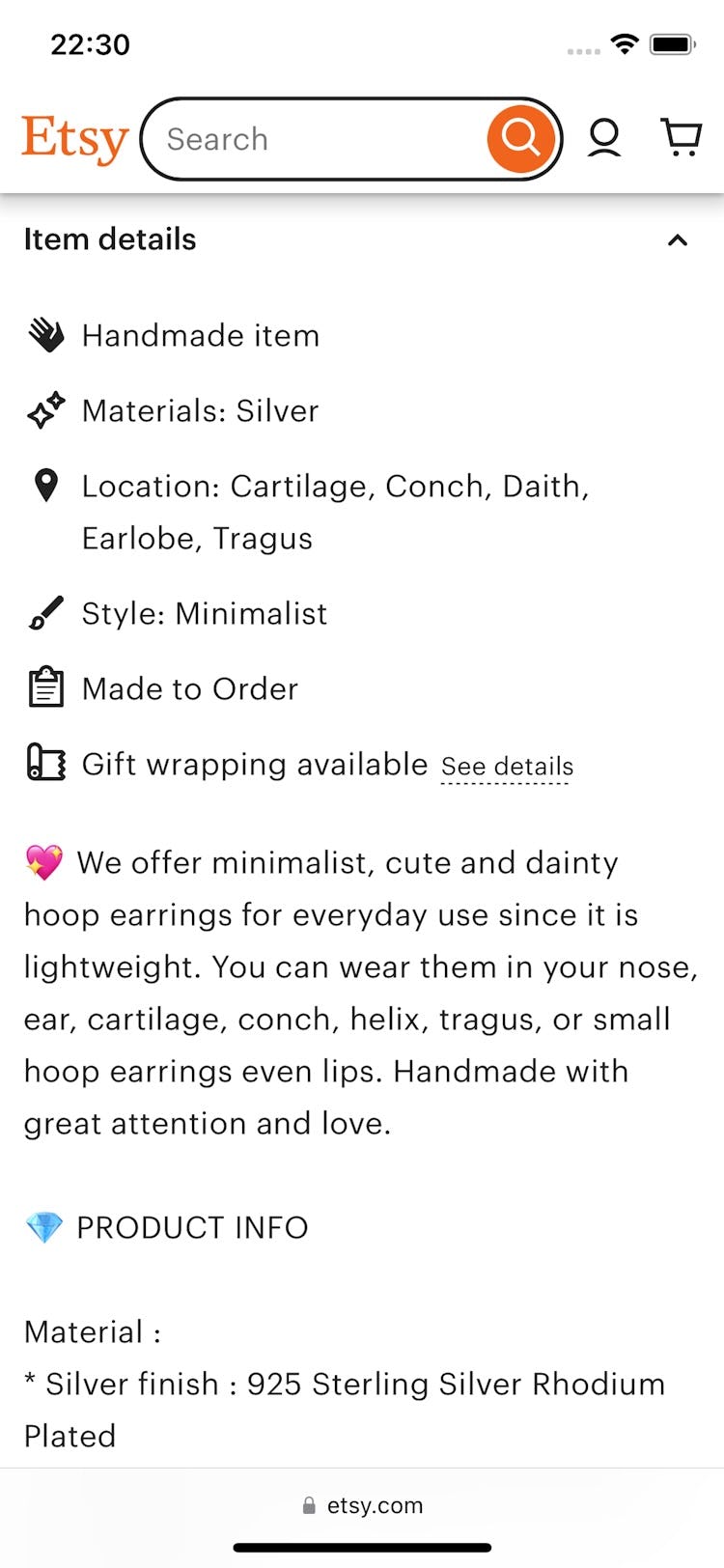

At Etsy, users can see the gifting options directly from the product page, before they decide to buy (first image). Tapping the “See details” link provides a description of the options, including a picture of the gift box (second image).


On the product page at Pen Heaven, users are offered the option to gift-wrap their product, are shown the additional cost of gift-wrapping, and are provided with a link to “More info” (first image). Additional information on available gift-delivery services — in this case, details about gift-wrapping, custom gift messages, and removal of price tags and paperwork — is shown in an overlay (second image). Providing a link to more details about gift options allows users to easily answer their gifting questions.
Therefore, it’s important to inform users early of gift-wrap availability by highlighting it as an option on the product page.
Advertising gifting options as early as the product page helps users keep their minds focused on finding the right gift — rather than prematurely worrying about whether gift options are offered during the checkout.
This information on the product page should clarify that gifting options are available, and provide additional details either directly on the product page or through a link to more information elsewhere.
To avoid cluttering the product details page when an abundance of gift options are available, clarifying information can be provided in a tooltip, overlay, or link rather than be fully described on the main product page.
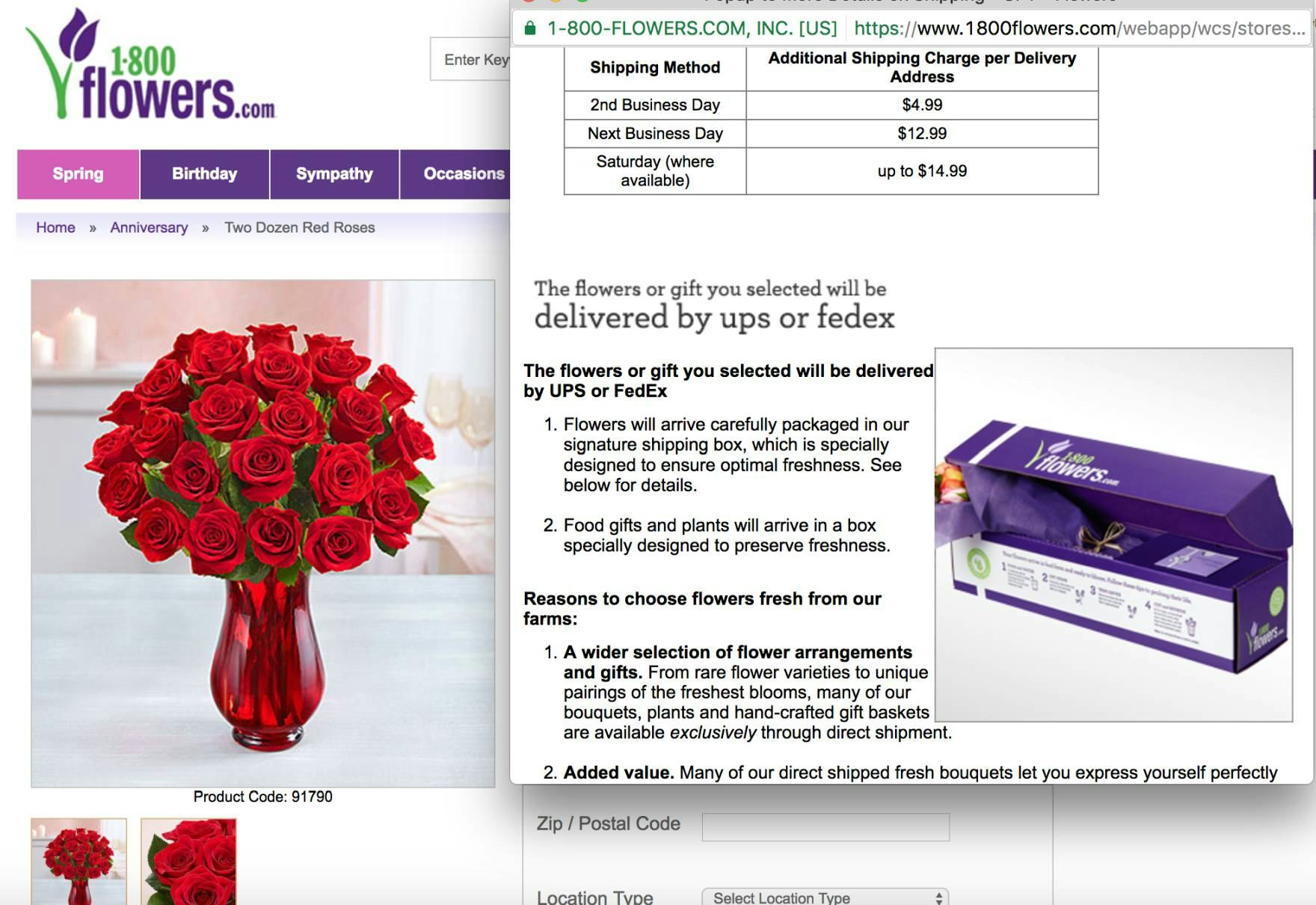
Gifting is a primary reason many users shop at 1-800flowers.com. Therefore, it makes sense to go into greater detail about the gifting options available on the product page. Allowing users to see what their gifts will look like upon final delivery — with gift boxes or custom gift messages — can put their minds at ease about their purchases.
For sites that ship most of their orders as gifts, providing more detailed gifting information as early as the product page offers a competitive advantage for those users who want to put extra care into their gift giving.
For example, offering detailed shipping information, pictures of gift boxes, and descriptions of how the gift will arrive all help considerate users to get a full picture of the gifting process — as compared to first adding a product to the cart in order to finally see the gift options.
3) Allow Users to Designate Gifts in the Cart (42% Don’t)

At Mejuri, no mention of gifting is offered in the cart, which may cause users intending to order a gift to hesitate to move forward.


At Sephora, users seeking to purchase a gift may not know that the site offers gift messaging or gift-wrap, as none of these benefits are offered or mentioned in the cart.
Some users may face anxiety and unease if they cannot see gifting options when they view their shopping cart.
Other users, coming to the site with the sole purpose of purchasing a gift, may misinterpret the lack of gifting options in the cart as an indication that the site doesn’t offer gifting at all, and may consequently abandon (see guideline #645).
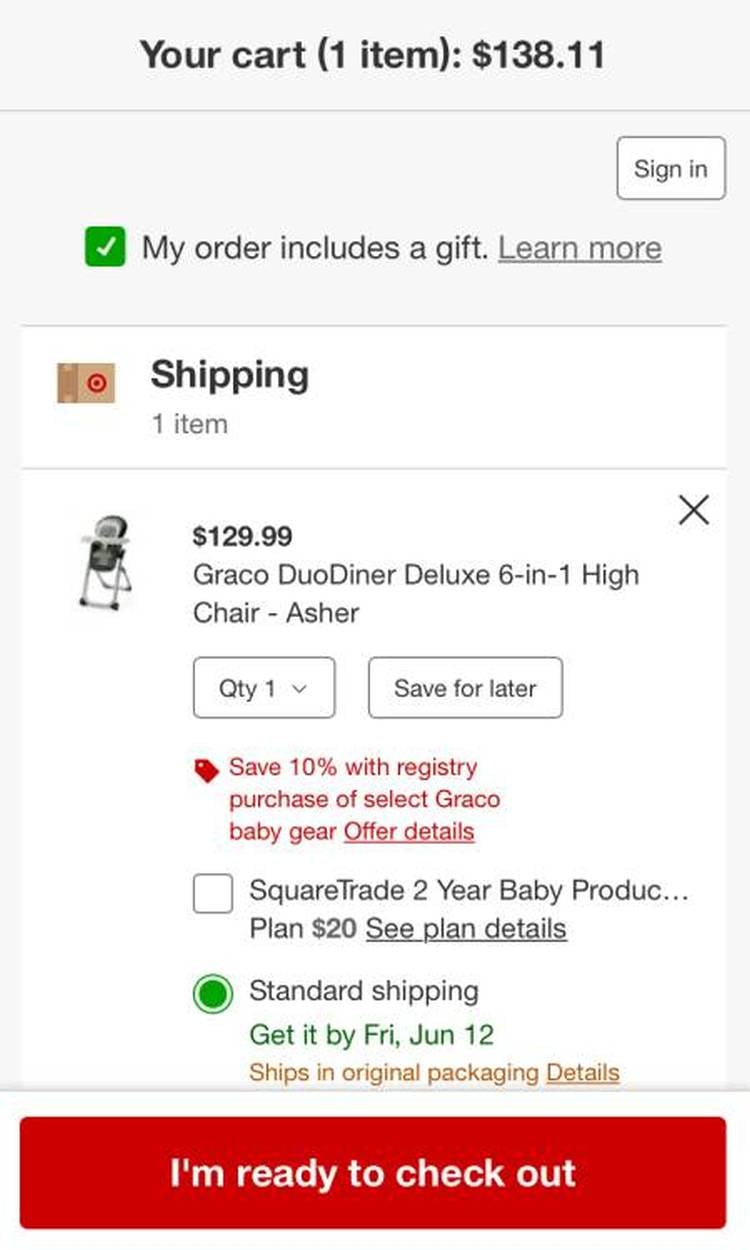
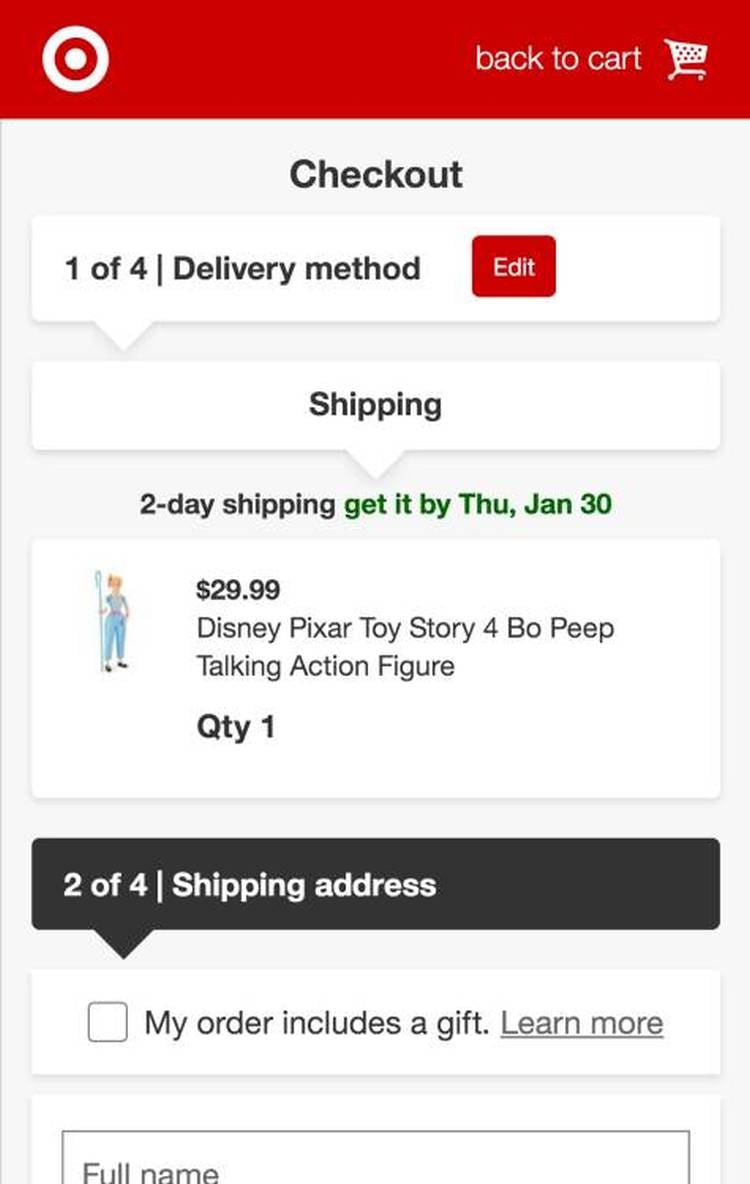
Target offers gifting options in both the cart (first image) and further in the checkout flow (second image), making it very easy for users to gift products.


“Let’s see if I can add a gift-wrap or message.” This participant at Apple was excited to add gift-wrapping to her order and immediately homed in on the option provided in the cart (first image), revealing an overlay with all available options and their associated costs (second image).
Thus, sites that have any kind of gifting options should allow users to designate one or more products as gifts in the cart.
However, if users in the “Added to Cart” interface have the option to bypass the cart step, then the cart step cannot be the only place where items or orders can be designated as a gift.
Instead, it must be possible to designate an order as a gift further in the checkout flow as well.
4) Dynamically Adjust Shipping Field Labels for Gift-Marked Orders (None Do)
When a user selects the option to gift an item, and arrives at checkout, they have 2 options:
- Send the gift directly to the recipient
- Send the gift to themselves (in order to give it to the recipient directly)

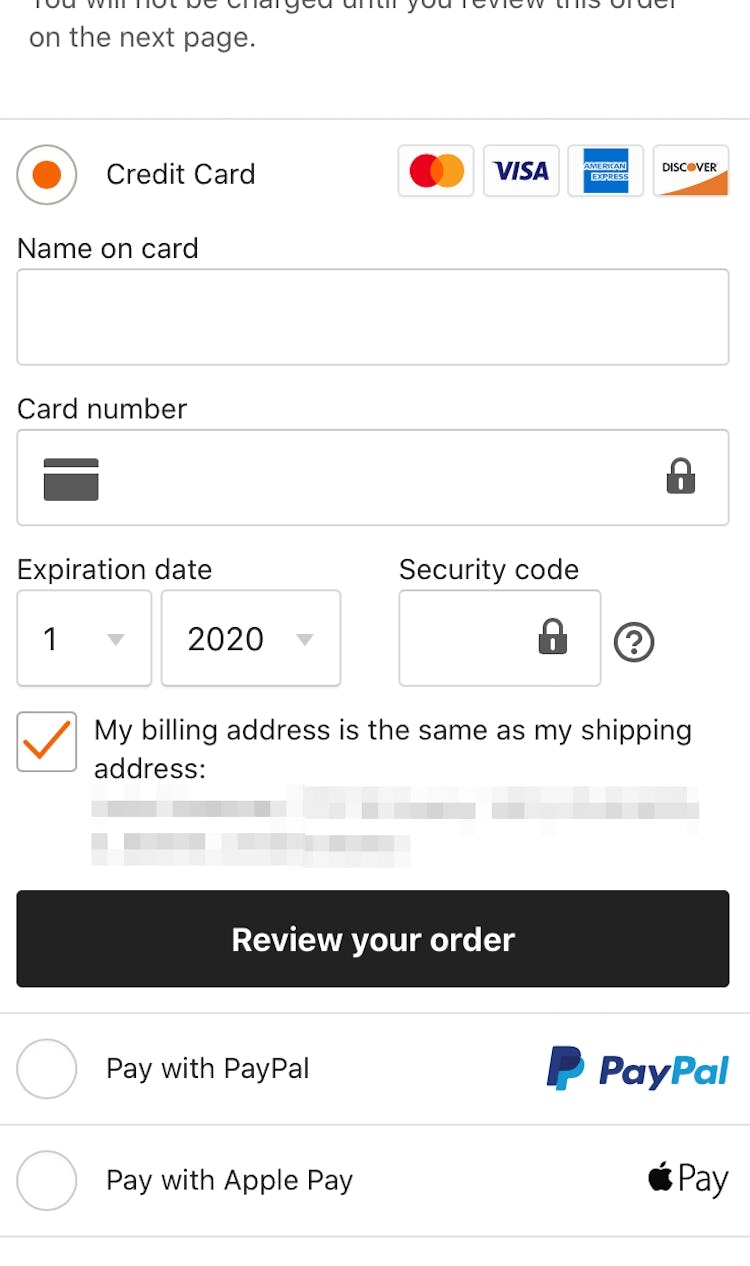
On Etsy, despite an order being marked as a gift in the cart (first image), “Billing = Shipping” is selected by default at the payment step (second image). Users looking to send this order as a gift would have to be very diligent in setting the shipping address as the recipient’s and the billing address as their own — something in practice many users are likely to overlook.


At Primary, returning and signed-in users who add gift options in the cart (first image) still have their saved default shipping address displayed during checkout (second image), making it more difficult for users to input or select the recipient’s address.
However, during testing, presenting gifting users with the same billing and shipping address selectors normally used for nongifting users was observed to be problematic — as users conflated their own billing or shipping address with the address of the intended gift recipient.
This added layer of complexity to the shipping process was observed to be the direct cause for orders placed with incorrect order data, and even site abandonments (see guideline #647).
Furthermore, using location data, account information, and previously entered user information to prefill shipping information form fields — which is recommended in most cases (see guidelines #573 and #568) — proved confusing for participants who were gifting orders.


At Walmart, designating the order as a gift in the cart (first image) results in the ”Same as delivery address” checkbox on the ”Payment” step being unchecked by default, in contrast to its usual default setting for nongift orders (second image). Going a step further, the site dynamically updates the ”Shipping Address” step to specify that the address should be the recipient’s (third image).

Like in the desktop example above, Walmart’s app adds the word “Recipient” to the heading (“Add recipient address”) and both the first and last name (“Recipient’s first name” and “Receipient’s last name”) to ensure that users know that they are providing the recipient’s address information during the gift-checkout flow.
If a user has already indicated that “the order is a gift”, then the billing address should no longer be defaulted to equal the shipping address — to reduce confusion and prevent users from inadvertently sending an item to themselves.
Even when they are signed-in to their accounts, once users mark their order as a gift they should be required to enter the gift recipient’s address (or select one from an address book), rather than being taken through the normal checkout flow (where any previously entered billing and shipping addresses may be used by default).
Lastly, the labeling itself can be improved by simply changing the title and label on the shipping address step to clarify that it’s the gift-recipient’s address that is being asked for — for example, labels like “Gift Recipient’s Name” and “Gift Recipient’s Shipping Address”.
Accommodate Users Placing Gift Orders throughout the Shopping Journey

Target does not offer gifting options on their product page. However, it allows users to do much more than simply add the product the cart — for example, allowing users to choose the product quantity and shipping speed, buy product insurance, and even to add the product to their registry (next to the tantalizing image of a gift box). Adding gifting options here would help those users looking to make a gift purchase feel confident going forward to the cart.
Most users do not give gifts every day, which only serves to increase the importance of the purchase experience when they do buy gifts.
Users can become confused and frustrated when they want to give a gift but cannot figure out how to do so or what the options are.
And, of course, no one wants to accidentally send the gift to the wrong place.
With these 4 research-backed strategies, though, sites can save users a lot of headaches (and potentially increase sales):
- Allow users to place gift orders (46% don’t)
- Show gifting options on the product page (80% don’t)
- Allow users to designate gifts in the cart (42% don’t)
- Dynamically adjust shipping field labels for gift-marked orders (none do)
Finally, while gifting is at its height during the holiday season — and so the gifting strategies discussed in this article are likely to gain special attention during these times — gifting happens even “off-season”, as users purchase gifts for birthdays, anniversaries, and other special events.
Therefore, improving the gifting experience on a site will offer benefits throughout the year.
This article presents the research findings from just a few of the 700+ UX guidelines in Baymard – get full access to learn how to create a “State of the Art” ecommerce user experience.
If you want to know how your desktop site, mobile site, or app performs and compares, then learn more about getting Baymard to conduct a UX Audit of your site or app.